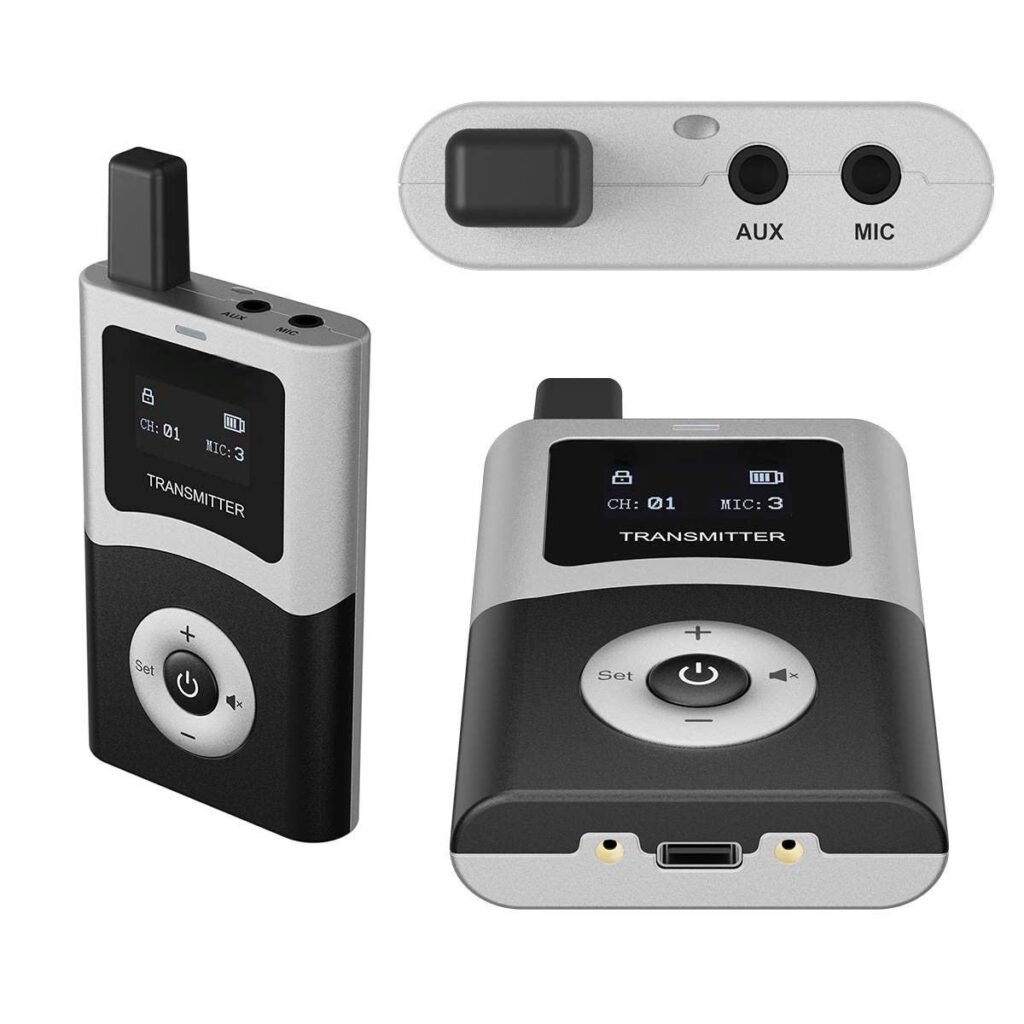
General Information:

– The transmitter operates in the UHF band. The operating range is approximately 200m in open spaces.
– Dimensions: 86 x 53 x 15 mm, weight: 72 g.
– Uses a rechargeable battery, continuously for approximately 12 hours. The display shows the transmitter’s battery capacity. Check the battery level at the end of the day and recharge if necessary.
– The transmitter includes a lanyard and 3.5 mm microphone.
– Microphone sensitivity has four levels, from 1 to 4. See the installation instructions for adjusting microphone sensitivity.

– Display:

Top line: Transmitter status (locked or unlocked—only opens when pairing the transmitter, changing channels, or resetting microphone sensitivity), transmitter muted or unmuted (when muted, a crossed speaker icon will appear), BT (Bluetooth connection to the phone), and device battery level.
Middle line: CH: transmitter channel, MIC: indicates the current microphone sensitivity level.
Bottom line: ALL OFF only appears when you press and hold the bottom button (with the “-” sign), then the transmitter will send a signal to turn off all receivers within its radius.
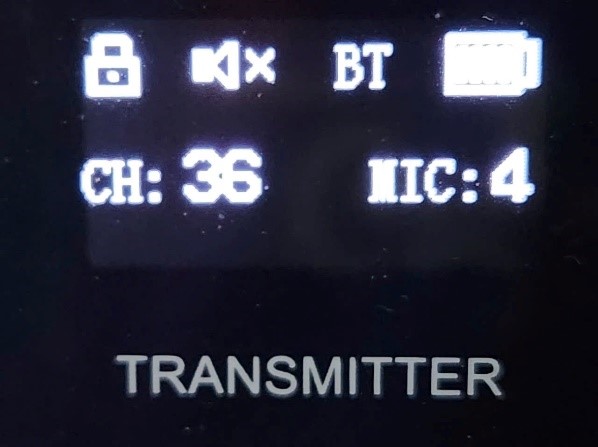
Màn hình máy phát

– In addition to the power button, the device has 4 keys (Set, +, – and mute):

The power button is in the middle:
Turn on the transmitter: Press and hold the POWER button until the power LED and screen appear.
Turn off the transmitter: Press and hold the POWER button until the power LED and screen turn off.
SET key: Used to enter and exit the Bluetooth connection with the phone. Tour guides should restrict the use of this key. BT mode must be turned off at all times.
+ key: Used to reset the transmitter. Press and hold to enter this mode (see below). Tour guides do not normally need to use this key.
– key: Used to turn off the receivers. Press and hold until the screen displays “ALL OFF.”
MUTE key: Press and hold until the screen displays the MUTE symbol on the first line. At this point, the transmitter will temporarily stop transmitting. To return to normal operation, press and hold the MUTE button until the MUTE icon disappears from the display.

Nút nhấn

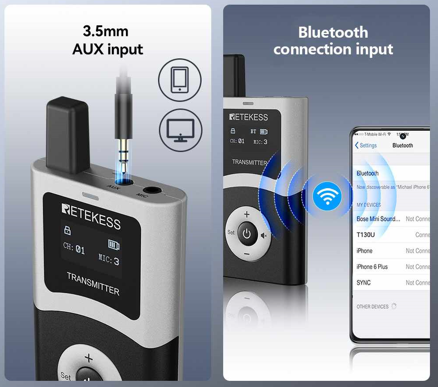
– The transmitter has two connectors: MIC for microphones and AUX for connecting devices that need to play audio with a 3.5mm output port. Note: Do not connect a microphone to AUX port!

– The transmitter can connect Bluetooth (BT) to your phone via BT. Press and hold the SET button until the power LED flashes and the transmitter is ready to connect to BT. When you need to disconnect: press and hold the SET button until the display no longer shows BT. To save the transmitter’s battery, do not use this function when not needed and disconnect BT immediately after use.
– When the battery runs low, you’ll need to recharge the device via the USB Type-C port or the charging case. The charging port is located on the bottom of the transmitter.

– Turn off the transmitter when not in use to save battery life. The transmitter cannot be turned off by itself, so the tour guide must turn it off proactively. Before turning off the transmitter, turn off the receivers.

The use of transmitter:

1. Plug the 3.5mm microphone into the MIC position and gently push the connector all the way in. Turn on the device and use it.

2. Reinstall the transmitter:

Normally, the tour guide will not reset the transmitter; this section is for reference only. To enter this mode, press and hold the “+” button until the device is no longer locked (the lock icon on the screen disappears). The transmitter will lock itself when there are no more settings left.
Here are some resets:
a) Adjust the microphone sensitivity level: press the MUTE button to the desired level (from 1 to 4, with level 4 being the most sensitive).
b) Set channels and pair the receiver:
– The receiver must be previously powered on.
– Press the “+” button to increase or the “-” button to decrease. The channel on the transmitter will change, and the receiver channel will also change accordingly.

3. Add some receivers to the group

a) Turn on the receivers you need to add.
b) Press and hold the “+” key until the transmitter is unlocked.
c) Gently press the “-” key to decrease the channel by 1, then gently press the “+” key to return the transmitter to its original channel (we did not change the group channel). At this point, the receiver has been synchronized with the group.

Common problems during use:

1. Turn on the power and the power LED does not light up.

Cause and solution: The transmitter has run out of battery and needs to be recharged.

2. The transmitter is working, but the receiver is not receiving signals (the signal column on the receiver’s display has NO bars).

Cause and solution: The transmitter may be in MUTE mode, or there is a mismatch between the transmitter and receiver channels. Deactivate MUTE mode or pair the two devices together.

3. The transmitter is working, but the receiver is not hearing any sound.

Cause and solution: The microphone may be mistakenly connected to the AUX port instead of the MIC port, or the headphones may not be fully connected or may be damaged. Try changing to a new pair of headphones.


If you encounter an issue that can’t be resolved, please replace it with a backup device or call Mr Bonsai’s 247 support number: +84946562285 (WhatsApp) or +84971462285 (Zalo).

THANK YOU!